/* ConductBiology Population genetics: the product page. Tool spec:
   docs/specs/2026-10-04-population-genetics-v1-spec.md. The tool lives at /population/app.
   The figures are real output from the simulated example dataset
   (scripts/make-population-figures.mjs). */

const POP_REPLACES = [
  ["STRUCTURE", "Ancestry runs over a range of K, in parallel, with the admixture model and ln P(D)"],
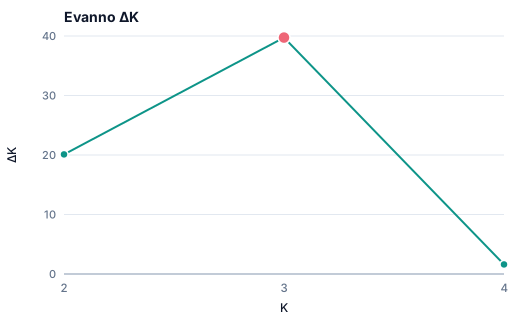
  ["STRUCTURE HARVESTER", "The Evanno ΔK table and plots, computed the same way"],
  ["CLUMPP", "Replicate runs aligned with the Greedy algorithm, with similarity H′ for each K"],
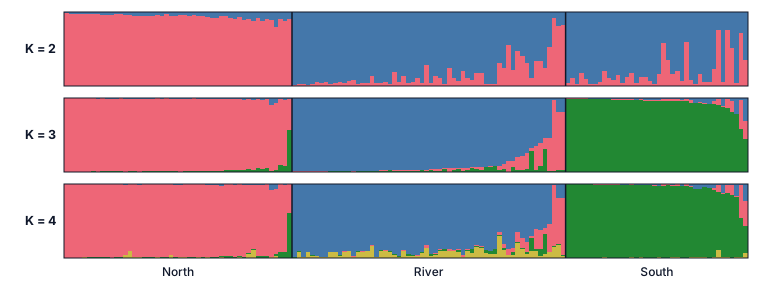
  ["DISTRUCT", "Bar plots grouped by population, colors kept across K, as SVG and PNG"],
  ["POPGENE and GenAlEx", "Na, Ne, Ho, He, uHe, FIS, allelic richness, private alleles, and Hardy-Weinberg tests"],
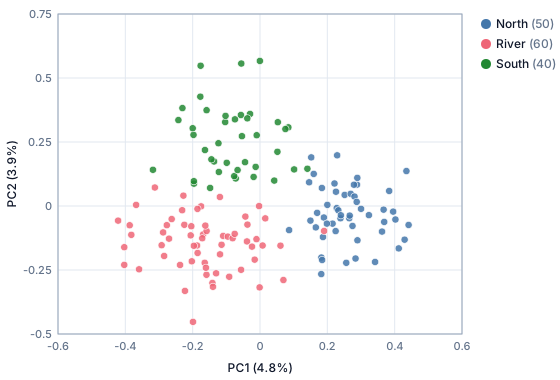
  ["R or a spreadsheet", "F-statistics, pairwise FST with permutations, Nei's distance and tree, PCA, and CSV tables"],
];

const POP_FORMAT_LIST = [
  ["STRUCTURE", "One or two rows per individual, with or without PopData"],
  ["Genepop", "Two- or three-digit alleles"],
  ["GenAlEx", "CSV or spreadsheet"],
  ["Tables", "CSV or spreadsheet with two columns per locus, or 152/156 genotypes"],
  ["VCF", "Plain or gzipped, with a population map"],
  ["PLINK", ".ped with its .map"],
];

function PopulationPage() {
  return (
    <>
      <Nav current="population" />
      <main>
        <PopulationHero />
        <PopulationReplaces />
        <PopulationOutputs />
        <PopulationHow />
      </main>
      <Footer />
    </>
  );
}

function PopulationHero() {
  return (
    <section style={{
      borderBottom: "1px solid var(--ink-200)",
      background: "radial-gradient(1000px 520px at 8% -12%, rgba(13,148,136,.10), transparent 60%), white",
    }}>
      <div className="page-wrap pop-hero">
        <div>
          <div style={{ display: "flex", alignItems: "center", gap: 10, flexWrap: "wrap" }}>
            <span className="mono" style={{ fontSize: 11.5, color: "var(--brand-700)", letterSpacing: ".12em", textTransform: "uppercase", fontWeight: 600 }}>
              ConductBiology Population genetics
            </span>
            <span className="chip chip-ok"><span className="dot"></span>Available</span>
          </div>
          <h1 style={{ margin: "16px 0 0", fontSize: "clamp(36px, 4.6vw, 60px)", lineHeight: 1.04, letterSpacing: "-0.025em", fontWeight: 700, color: "var(--ink-900)", textWrap: "balance" }}>
            From genotype file to population structure, in one place
          </h1>
          <p style={{ margin: "22px 0 0", fontSize: 18, lineHeight: 1.55, color: "var(--ink-600)", maxWidth: 580, textWrap: "pretty" }}>
            Load a STRUCTURE, Genepop, GenAlEx, VCF, or PLINK file. Get diversity tables, F-statistics, PCA,
            ancestry runs across K with ΔK, aligned bar plots, and a methods section you can paste.
          </p>
          <div style={{ marginTop: 30, display: "flex", gap: 12, flexWrap: "wrap" }}>
            <a href="/signup?module=population" className="btn btn-primary btn-tap" style={{ padding: "12px 18px", fontSize: 15, boxShadow: "0 6px 20px -6px rgba(13,148,136,.45)" }}>
              Join the beta <ArrowRight />
            </a>
            <a href="/population/app?example=microsat" className="btn btn-ghost btn-tap" style={{ padding: "12px 18px", fontSize: 15 }}>
              Try the example
            </a>
          </div>
          <div style={{ marginTop: 14, fontSize: 13, color: "var(--ink-500)" }}>
            Free during the beta · runs in your browser · genotypes are never uploaded
          </div>
        </div>
        <figure className="card" style={{ margin: 0, padding: 14, overflow: "hidden" }}>
          <img src="/population/examples/figure-ancestry.svg" alt="Ancestry bar plot for K = 2 to 4 from the simulated example: three populations, North, River, and South, with admixed individuals in River" style={{ display: "block", width: "100%", height: "auto" }} />
          <figcaption style={{ marginTop: 8, fontSize: 12, color: "var(--ink-500)" }}>Simulated example, K = 2 to 4, mean of aligned runs. Made in the tool.</figcaption>
        </figure>
      </div>
    </section>
  );
}

function PopulationReplaces() {
  return (
    <section className="section">
      <div className="page-wrap">
        <SectionTitle eyebrow="One tool instead of six" title="The usual chain, in one place"
                      sub="Each program in the usual chain wants its own input format. Here one file goes in and everything comes out together, from the same filtered data." />
        <div className="grid-3" style={{ marginTop: 32 }}>
          {POP_REPLACES.map(([before, after]) => (
            <div key={before} className="card" style={{ padding: 20 }}>
              <div className="mono" style={{ fontSize: 11, color: "var(--ink-500)", letterSpacing: ".06em", textTransform: "uppercase" }}>Instead of {before}</div>
              <p style={{ margin: "8px 0 0", fontSize: 15, lineHeight: 1.5, color: "var(--ink-900)" }}>{after}</p>
            </div>
          ))}
        </div>
      </div>
    </section>
  );
}

function PopulationOutputs() {
  return (
    <section className="section" style={{ borderTop: "1px solid var(--ink-200)", background: "var(--ink-50)" }}>
      <div className="page-wrap">
        <SectionTitle eyebrow="What you get" title="Figures, tables, and the methods paragraph" />
        <div className="grid-2" style={{ marginTop: 32, alignItems: "start" }}>
          <figure className="card" style={{ margin: 0, padding: 14 }}>
            <img src="/population/examples/figure-delta-k.svg" alt="Evanno delta K by K for the simulated example, highest at K = 3" style={{ display: "block", width: "100%", height: "auto" }} loading="lazy" />
            <figcaption style={{ marginTop: 8, fontSize: 13, color: "var(--ink-600)" }}>Evanno ΔK from replicate runs at each K.</figcaption>
          </figure>
          <figure className="card" style={{ margin: 0, padding: 14 }}>
            <img src="/population/examples/figure-pca.svg" alt="PCA of individuals in the simulated example, colored by population" style={{ display: "block", width: "100%", height: "auto" }} loading="lazy" />
            <figcaption style={{ marginTop: 8, fontSize: 13, color: "var(--ink-600)" }}>PCA of individuals, colored by population.</figcaption>
          </figure>
        </div>
        <div className="split-2" style={{ marginTop: 20 }}>
          <div className="panel" style={{ padding: 24 }}>
            <h3 style={{ margin: 0, fontSize: 16, fontWeight: 600 }}>A methods section written from your run</h3>
            <p style={{ margin: "10px 0 0", fontSize: 14.5, lineHeight: 1.6, color: "var(--ink-700)" }}>
              Sample sizes, filters, permutation counts, K range, run lengths, seeds, and the results that matter, with the
              references for every method used. Copy it or download it as Markdown.
            </p>
            <h3 style={{ margin: "20px 0 0", fontSize: 16, fontWeight: 600 }}>A run record you can repeat</h3>
            <p style={{ margin: "10px 0 0", fontSize: 14.5, lineHeight: 1.6, color: "var(--ink-700)" }}>
              The file fingerprint, settings, and seeds go in one JSON file. Load it with the same genotype file to run
              again and check that the results match.
            </p>
          </div>
          <div className="panel" style={{ padding: 24 }}>
            <h3 style={{ margin: 0, fontSize: 16, fontWeight: 600 }}>Formats</h3>
            <dl style={{ margin: "12px 0 0", display: "grid", gap: 8 }}>
              {POP_FORMAT_LIST.map(([name, note]) => (
                <div key={name} style={{ display: "grid", gridTemplateColumns: "92px minmax(0,1fr)", gap: 10, fontSize: 14 }}>
                  <dt style={{ fontWeight: 600, color: "var(--ink-900)" }}>{name}</dt>
                  <dd style={{ margin: 0, color: "var(--ink-600)" }}>{note}</dd>
                </div>
              ))}
            </dl>
          </div>
        </div>
      </div>
    </section>
  );
}

function PopulationHow() {
  const steps = [
    ["1", "Load your file", "The tool reads the format, shows individuals, populations, loci, and missing data, and lets you correct how it read the file."],
    ["2", "Check and filter", "Drop monomorphic loci, loci or individuals with too much missing data, or rare alleles. Set the population order."],
    ["3", "Run", "Choose the analyses, the K range, runs per K, and run length. Runs go in parallel on your computer."],
    ["4", "Export", "Download every figure and table, the methods section, and the run record, one at a time or as a ZIP."],
  ];
  return (
    <section className="section">
      <div className="page-wrap">
        <SectionTitle eyebrow="How it works" title="Four steps, about a minute for the example" />
        <div className="grid-4" style={{ marginTop: 32 }}>
          {steps.map(([n, title, body]) => (
            <div key={n} className="card" style={{ padding: 22 }}>
              <div className="mono" style={{ width: 30, height: 30, borderRadius: 6, background: "var(--brand-50)", color: "var(--brand-700)", display: "flex", alignItems: "center", justifyContent: "center", fontSize: 12, fontWeight: 600 }}>{n}</div>
              <h3 style={{ margin: "14px 0 0", fontSize: 16, fontWeight: 600, color: "var(--ink-900)" }}>{title}</h3>
              <p style={{ margin: "6px 0 0", fontSize: 14, lineHeight: 1.55, color: "var(--ink-600)" }}>{body}</p>
            </div>
          ))}
        </div>
        <div style={{ marginTop: 28, display: "flex", gap: 12, flexWrap: "wrap" }}>
          <a href="/population/app" className="btn btn-primary btn-tap" style={{ padding: "12px 18px", fontSize: 15 }}>Open the tool <ArrowRight /></a>
          <a href="/signup?module=population" className="btn btn-ghost btn-tap" style={{ padding: "12px 18px", fontSize: 15 }}>Join the beta</a>
        </div>
        <p style={{ margin: "24px 0 0", maxWidth: 820, fontSize: 13, lineHeight: 1.6, color: "var(--ink-500)" }}>
          Diploid data. For very large SNP sets, thin the data first; the tool handles up to 100 million genotypes.
        </p>
      </div>
    </section>
  );
}

Object.assign(window, { PopulationPage });